

Starting the server
~/.fabro/fabro.sock by default. Use --bind 127.0.0.1 for TCP.
First run: web install wizard
If~/.fabro/settings.toml does not yet exist, fabro server start enters install mode: it prints an install URL and a one-time install token, attempts to open the URL in your default browser, and serves a web wizard that walks you through configuring your server URL, shared object store, LLM provider, and GitHub integration.
The LLM step can be completed with one or more provider keys, or explicitly skipped so you can finish server setup first and add model credentials later. A skipped LLM step writes no LLM vault credentials; LLM-dependent workflows keep failing with provider-not-configured errors until credentials are added. Optional integration secrets collected by install mode, including LLM keys and GitHub App secrets, are written to the server vault rather than server.env.
When Fabro can construct a direct install URL, the token is embedded in the URL and also printed on its own line for copying. If you open the server root through a reverse proxy or another machine, paste the printed install token when prompted.
The Object store step offers two wizard-managed modes:
Local diskfor a host-local object-store root, detected by default and editable before continuingAWS S3for one bucket with the fixedartifacts/prefix
AWS_ACCESS_KEY_ID and AWS_SECRET_ACCESS_KEY in server.env. It does not collect STS/session tokens or S3-compatible endpoint settings. If you need MinIO, Cloudflare R2, path-style options, or custom endpoints, finish install with local defaults and then edit [server.artifacts] in settings.toml manually.
When you finish the wizard, the server writes ~/.fabro/settings.toml and exits cleanly. Start it again to boot in configured mode:
restart: unless-stopped, systemd, or Railway’s restart-on-exit) this second start happens automatically.
For headless or scripted environments where no browser is available, run fabro install instead — it’s the same wizard as a CLI prompt flow.
Common flags:
See Server Configuration for the full
settings.toml reference.
Upgrading from SlateDB
Fabro stores current run history and content-addressed blobs in SQLite. Upgrading from a release that stored these in SlateDB does not automatically import them, so those older runs are not available in the current application. The upgrade leaves existing SlateDB run history and blobs in their original local storage directory or object-store location. Retain that data if you may need to recover historical runs using a reader compatible with the older storage format. Artifact files use the separate local or S3 object store configured through[server.artifacts] in Server Configuration.
Legacy SlateDB settings
When Fabro loads active server settings that still contain[server.slatedb],
it backs up the settings file and removes that section and its subtables.
For settings.toml, the backup is
settings.toml.server-slatedb-migration.bak beside the original file. Existing
backups are preserved; further backups use numbered suffixes such as
settings.toml.server-slatedb-migration.1.bak. A warning identifies the
rewritten file and its backup. Other settings are preserved by this cleanup,
and subsequent loads do nothing once the section is absent.
This cleanup changes configuration only. The settings backup contains no run
history or blobs.
SQLite schema upgrades
On startup, Fabro applies pending SQLite schema migrations before serving normal traffic. Before changing a database that has previously applied migrations, it writes a snapshot beside the database asfabro.sqlite3.pre-migration.bak. A fresh database or a restart with no pending
migrations does not create a new snapshot. Each later schema upgrade replaces
this snapshot; failure to create it stops the upgrade.
The Petri transition drops the former SQL run_events table and its activation
bookkeeping. Those events are not converted into Petri run history. Current
runs use Petri records and Fabro platform records in SQLite.
For a database rollback, stop the server and restore the .pre-migration.bak
snapshot, then remove any -wal and -shm siblings before starting the
corresponding older binary. The snapshot holds the database state immediately
before the most recent schema upgrade. Restoring it loses database writes
accepted after that snapshot.
Submitting runs
Register the workflow content, create a run from that version, then request execution. This example uses a clone-based default environment and an empty workspace target; add the authentication headers required by your server:runnable runs to running in FIFO order, up to the concurrency limit. Parent-generated child runs can remain pending until a user approves them.
Run lifecycle
- Submit —
POST /api/v1/runscreates the run with statussubmitted. - Start request —
POST /api/v1/runs/{id}/startmakes normal runsrunnable; parent-generated child runs may becomependingwithapproval_required. - Approve if needed — Approving a pending child run makes it
runnable; denying it fails withapproval_denied. - Schedule — The scheduler picks up
runnableruns up tomax_concurrent_runs. - Execute — The engine walks the graph, streaming events to all subscribers.
- Complete — The run transitions to
succeeded,failed, ordead.
Web UI
The web UI connects to the API server and provides:- Runs board — Monitor all active runs organized by status
- Run detail — Real-time stage progress, event stream, diffs, and usage stats
- Files Changed — Browse changed files with a searchable tree, per-file status, aggregate diff stats, and split or stacked diffs
- Settings — Inspect server configuration, enabled integrations, storage, auth, and capacity settings
- Start new run — Submit workflows from the browser
- Human-in-the-loop — Answer agent questions through the web interface
- Workflows — Browse available workflows, view their graphs, and see run history
- Insights — SQL-based analysis across runs via DuckDB
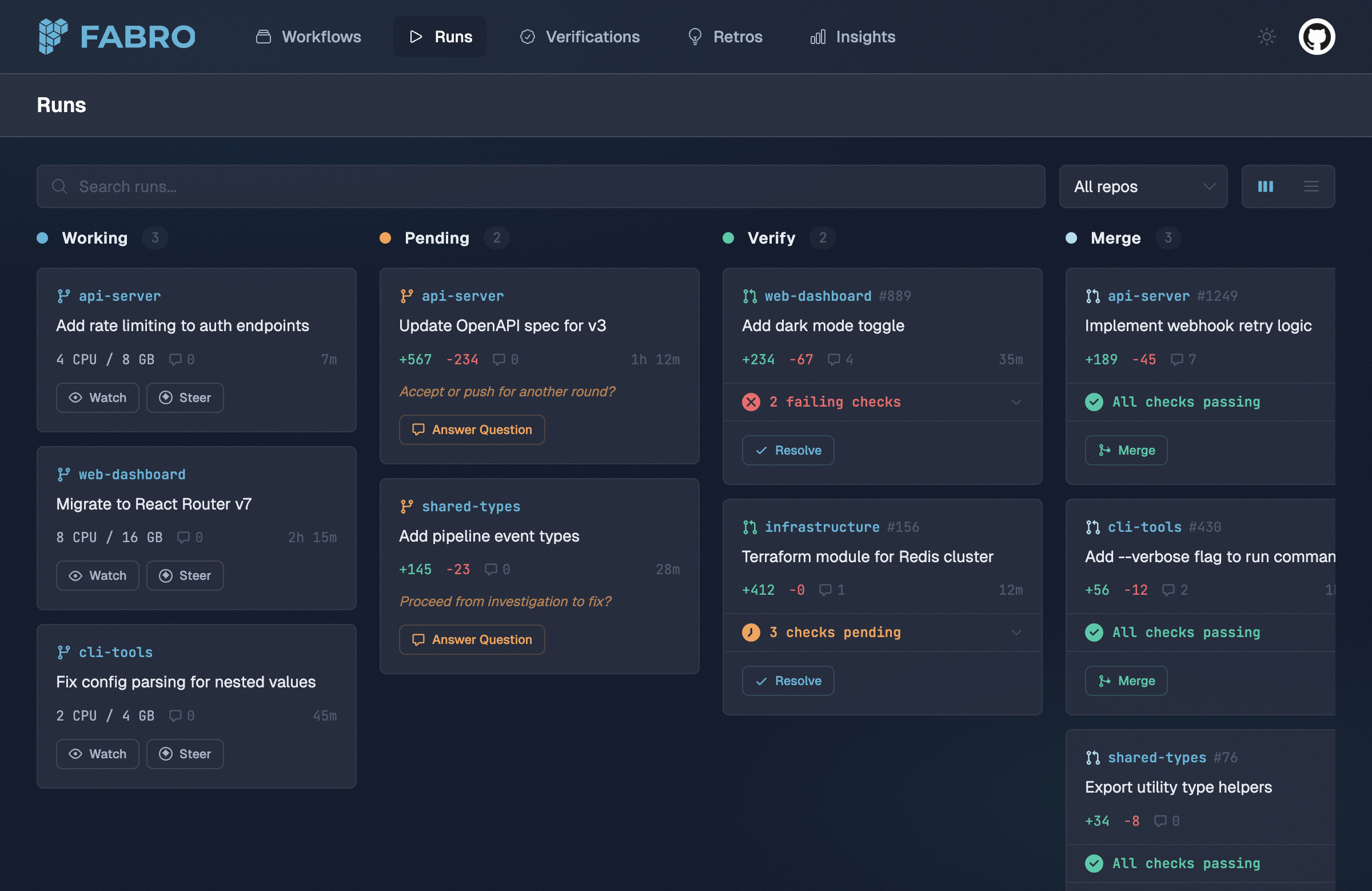
The Runs board shows all active runs organized by status.
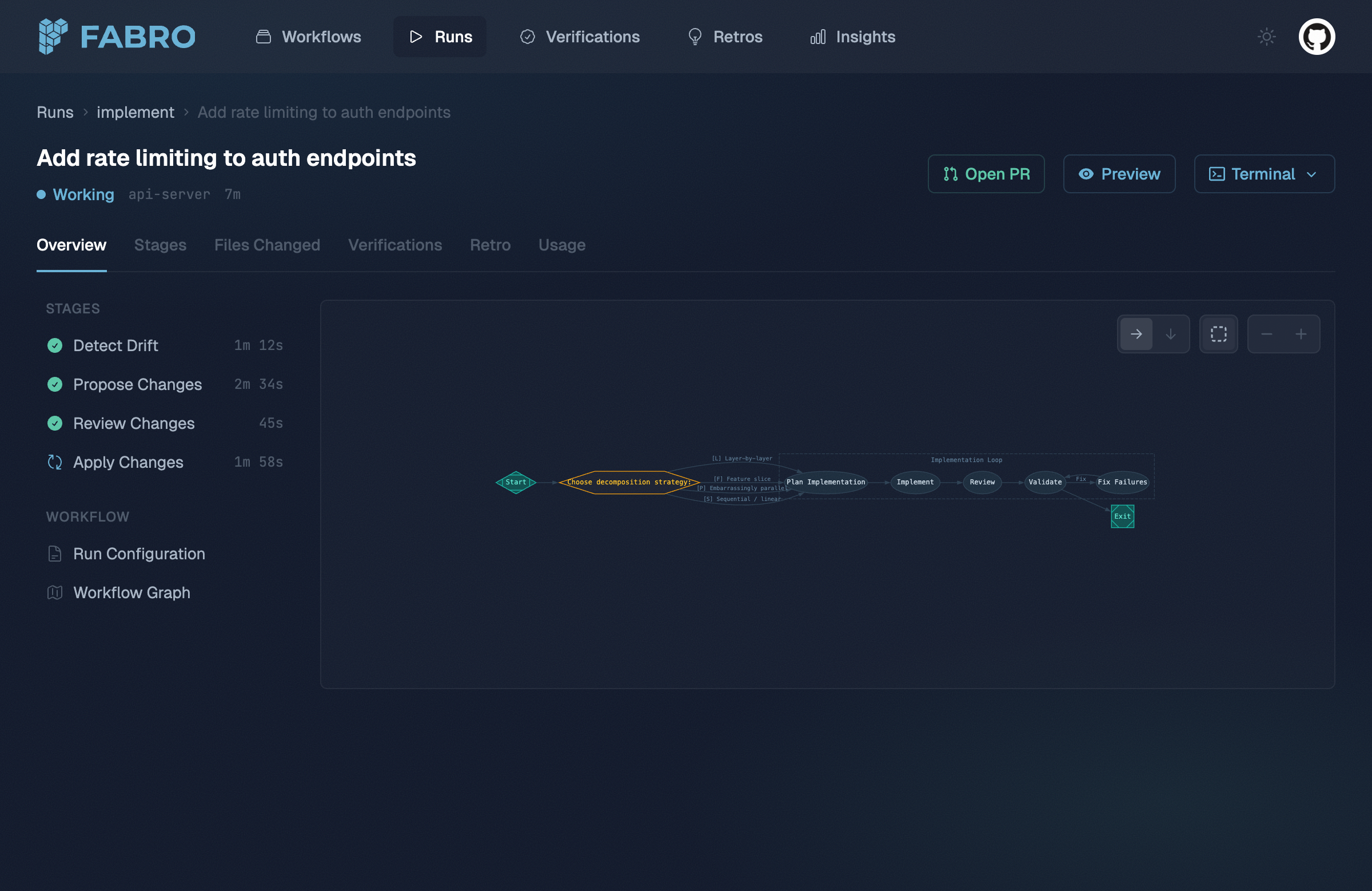
The run detail view shows stage progress alongside the workflow graph.
Event streaming
The API streams run events via Server-Sent Events (SSE). Every stage start, LLM call, tool invocation, and edge selection is emitted as a structured JSON event. Any HTTP client that supports SSE can subscribe — the web UI is just one consumer.Human-in-the-loop
Human-in-the-loop questions are served over HTTP. The engine blocks the current stage until an answer is submitted, then continues execution. See the list questions and submit answer API reference pages.Authentication
The server configures auth withserver.auth.methods:
dev-token— Operators can call the API directly withAuthorization: Bearer fabro_dev_..., and the web login page can accept the dev token too.github— End users sign in through GitHub OAuth and receive a browser session cookie.
settings.toml
Demo mode
Send theX-Fabro-Demo: 1 header on any API request to get static mock data. To enable demo mode in the web UI, set the fabro-demo=1 cookie in your browser devtools (Application → Cookies). This lets you explore the UI without API keys or real workflow execution.
Pointing the CLI at a server
The CLI can target a running Fabro server for commands that support a remote API. Configure~/.fabro/settings.toml:
settings.toml
--server flag:
fabro model list and fabro model test honor [cli.target] by default unless you explicitly pass --storage-dir. fabro exec remains a local agent session and only uses the server when you pass --server.
See User Configuration for the full connection options, including client certificates for proxy-terminated HTTPS endpoints.
Next steps
Deployment
Choose where the server runs: laptop or self-hosted Docker container.
Server Configuration
Full settings.toml reference — authentication, reverse-proxy TLS, run defaults, and more.
API Reference
REST API for submitting runs, streaming events, and managing resources.
How Fabro Works
The workflow engine and architecture.