Fabro captures a structured event for every significant action during a workflow run — stage starts and completions, agent tool calls, edge selections, retries, failovers, sandbox lifecycle, and more. These events power real-time monitoring, post-run analysis, and cross-run analytics.

Event stream

The event stream is the foundation of Fabro’s observability. Every workflow run emits a sequence of WorkflowRunEvent records that are:
  • Written to progress.jsonl in the run’s directory (one JSON object per line)
  • Broadcast via SSE to connected API clients in real time
  • Logged via tracing to the daily log file at ~/.fabro/logs/

Event types

Events fall into several categories: Run lifecycle — bookend events for the entire run:
EventKey fieldsDescription
WorkflowRunStartedname, run_id, base_sha, run_branchRun begins
WorkflowRunCompletedduration_ms, artifact_count, total_costRun finishes successfully
WorkflowRunFailederror, duration_msRun terminates with an error
Stage lifecycle — events for each node execution:
EventKey fieldsDescription
StageStartednode_id, name, handler_type, attempt, max_attemptsNode begins executing
StageCompletednode_id, duration_ms, status, usage, files_touchedNode finishes
StageFailednode_id, failure, will_retryNode fails (may or may not retry)
StageRetryingnode_id, attempt, max_attempts, delay_msRetry scheduled after failure
Agent activity — forwarded from the LLM agent session, prefixed with Agent.:
EventKey fieldsDescription
Agent.SessionStartedstageAgent session begins
Agent.ToolCallStartedstage, tool_name, argumentsAgent invokes a tool
Agent.ToolCallCompletedstage, tool_name, output, is_errorTool returns a result
Agent.AssistantMessagestage, text, model, usageLLM responds with text
Agent.Errorstage, errorAgent-level error
Agent.LoopDetectedstageRepeated tool call pattern detected
Agent.SteeringInjectedstage, textHuman steering message injected
Agent.ContextWindowWarningstage, estimated_tokens, context_window_size, usage_percentToken usage exceeds context window threshold
Agent.CompactionStartedstage, estimated_tokens, context_window_sizeContext compaction triggered
Agent.CompactionCompletedstage, original_turn_count, preserved_turn_count, summary_token_estimate, tracked_file_countContext compaction finished
Agent.LlmRetrystage, provider, model, attempt, delay_secsLLM API call retried
Agent.SubAgentSpawnedstage, agent_id, taskSub-agent launched
Agent.SubAgentCompletedstage, agent_id, success, turns_usedSub-agent finished
Routing and control flow:
EventKey fieldsDescription
EdgeSelectedfrom_node, to_node, label, conditionTransition between nodes
LoopRestartfrom_node, to_nodeLoop restart edge taken
CheckpointSavednode_idCheckpoint written to disk
GitCheckpointnode_id, git_commit_shaCheckpoint committed to Git
Failoverstage, from_provider, to_provider, errorLLM provider failover
Parallel execution:
EventKey fieldsDescription
ParallelStartedbranch_count, join_policy, error_policyFan-out begins
ParallelBranchStartedbranch, indexIndividual branch begins
ParallelBranchCompletedbranch, duration_ms, statusBranch finishes
ParallelCompletedduration_ms, success_count, failure_countAll branches done
Human-in-the-loop:
EventKey fieldsDescription
InterviewStartedquestion, stage, question_typeHuman input requested
InterviewCompletedquestion, answer, duration_msHuman responded
InterviewTimeoutquestion, stage, duration_msHuman didn’t respond in time
Sandbox and setup:
EventKey fieldsDescription
Sandbox.InitializingproviderSandbox creation started
Sandbox.Readyprovider, duration_ms, cpu, memorySandbox ready
SetupStartedcommand_countSetup commands beginning
SetupCommandCompletedcommand, exit_code, duration_msSingle setup command finished
SetupFailedcommand, exit_code, stderrSetup command failed
SshAccessReadyssh_commandSSH connection command printed
StallWatchdogTimeoutnode, idle_secondsNo activity for too long

Event envelope format

Each line in progress.jsonl is a JSON object with a standard envelope:
{
  "ts": "2026-03-05T14:30:01.234Z",
  "run_id": "01JKXYZ...",
  "event": "Agent.ToolCallStarted",
  "stage": "implement",
  "tool_name": "shell",
  "arguments": {"command": "cargo test"}
}
The ts, run_id, and event fields are always present. The remaining fields vary by event type. Events are flattened — nested variants like agent and sandbox events use dot notation (e.g. Agent.ToolCallStarted, Sandbox.Ready).

Log files

Fabro writes two kinds of logs:

Run logs (progress.jsonl)

Every run writes its event stream to {run_dir}/progress.jsonl. This is the primary data source for post-run analysis — retros read it, and you can query it directly with standard tools:
# Count tool calls in a run
grep "ToolCallStarted" ~/.fabro/runs/01JKXYZ.../progress.jsonl | wc -l

# Find all failures
grep -E "StageFailed|WorkflowRunFailed" ~/.fabro/runs/01JKXYZ.../progress.jsonl | jq .

# See which edges were taken
grep "EdgeSelected" ~/.fabro/runs/01JKXYZ.../progress.jsonl | jq '{from: .from_node, to: .to_node}'

Live snapshot (live.json)

During execution, Fabro also writes live.json — a pretty-printed copy of the most recent event. This is useful for quick status checks while a run is in progress:
cat ~/.fabro/runs/01JKXYZ.../live.json

Application logs

Fabro uses the tracing crate to write structured logs to ~/.fabro/logs/YYYY-MM-DD.log. Control the log level with the FABRO_LOG environment variable:
FABRO_LOG=debug fabro run workflow.fabro
LevelWhat’s logged
errorRun failures, stage failures that won’t retry
warnRetries, timeouts, interview timeouts, failovers, early terminations
infoRun start/complete, SSH access ready
debugStage start/complete, edge selections, checkpoints, parallel branches, tool calls

Real-time monitoring

API: Server-Sent Events

When running workflows through the API server, subscribe to a live event stream via the run events endpoint. Each event is a JSON-serialized WorkflowRunEvent. The stream stays open until the run completes.

Web UI

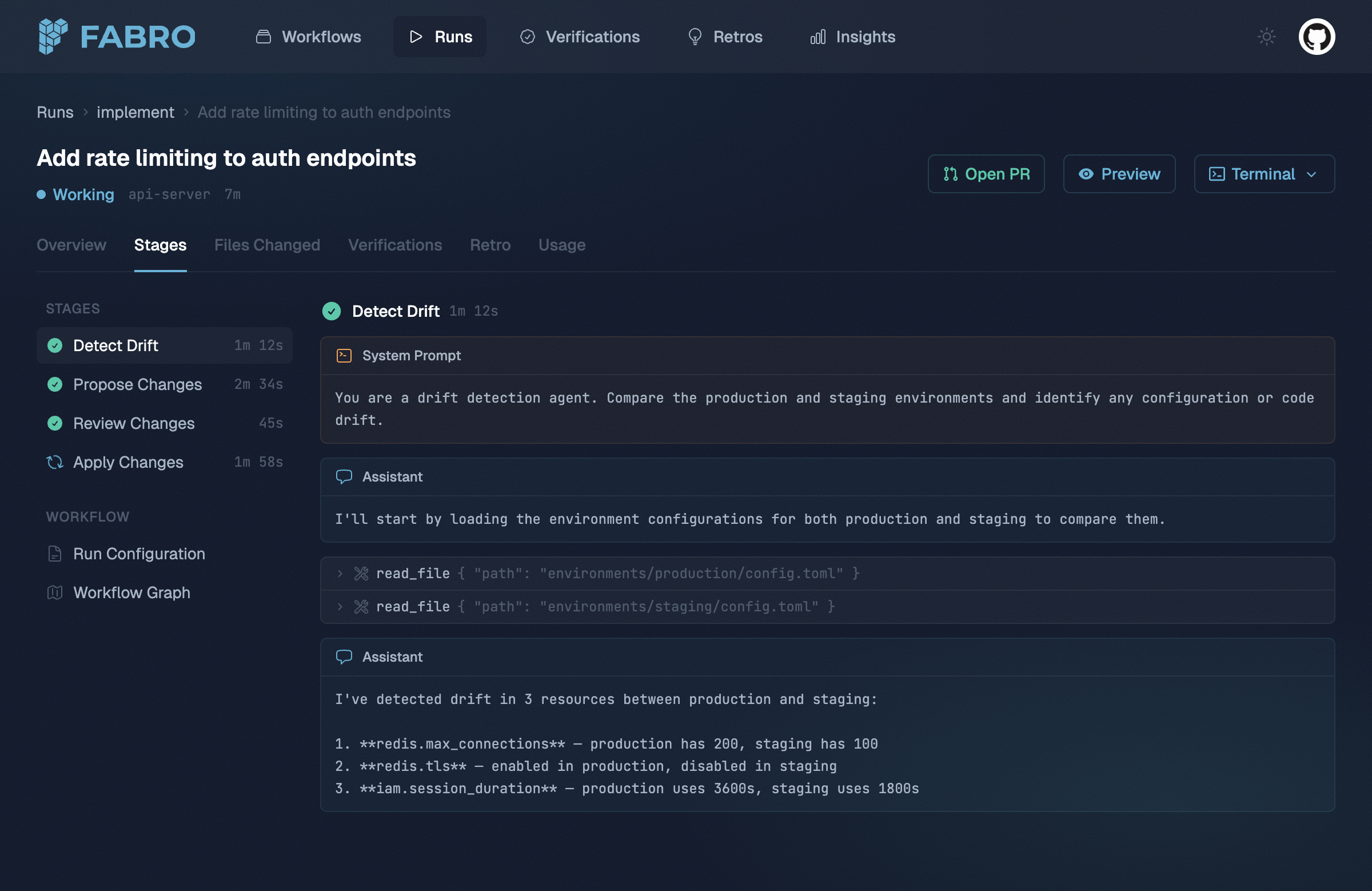
The web frontend connects to the SSE stream automatically and displays run progress in real time — stage transitions, agent tool calls, and human gate prompts are all visible as they happen.
Fabro web UI run stages showing agent conversation with tool calls

CLI progress

The CLI displays a live progress bar during execution with per-stage status, duration, and cost tracking. This is rendered to stderr so it doesn’t interfere with output piping.

Post-run analysis

Listing runs

Browse your run history with fabro ps:
fabro ps
fabro ps --workflow PlanImplement
fabro ps --before 2026-03-01
fabro ps --label team=platform
fabro ps --json
This scans ~/.fabro/runs/ and displays each run’s ID, workflow name, status, and start time. Use --json for machine-readable output.

Run artifacts

Each run’s directory contains a standard set of files:
FileDescription
manifest.jsonRun metadata — ID, workflow name, start time, labels
progress.jsonlFull event stream
live.jsonLast event snapshot (overwritten during run)
checkpoint.jsonFinal execution state
retro.jsonRetrospective (if retro generation is enabled)
conclusion.jsonTerminal status (completed, failed, canceled)

Inspecting stages and turns

The API provides endpoints for drilling into individual stages and the agent turns within them. See the stages and turns API reference for details.

Insights (SQL analytics)

The Insights feature lets you run SQL queries across your run data using DuckDB. This is useful for aggregate analysis — finding slow workflows, tracking failure rates, comparing model costs, and spotting trends. Insights is managed through the Insights API endpoints. You can save, update, and execute queries programmatically.

Example queries

Average run duration by workflow:
SELECT workflow_name, AVG(duration_seconds) as avg_duration,
       COUNT(*) as run_count
FROM runs
GROUP BY workflow_name
ORDER BY avg_duration DESC
LIMIT 20
Daily failure rate:
SELECT date_trunc('day', created_at) as day,
       COUNT(*) FILTER (WHERE status = 'failed') as failures,
       COUNT(*) as total
FROM runs
GROUP BY 1
ORDER BY 1 DESC
LIMIT 30
Top repositories by activity:
SELECT repo, COUNT(*) as runs
FROM runs
GROUP BY repo
ORDER BY runs DESC

Aggregate usage

The API server tracks aggregate usage counters across all runs — total run count, total runtime, and per-model breakdowns of token usage and cost. See the usage endpoint in the API reference. Counters reset on server restart.
Fabro web UI run usage showing per-stage and per-model token and cost breakdown

Credential redaction

All event output — progress.jsonl, SSE streams, and log files — is automatically redacted before being written. Fabro detects and replaces patterns that look like API keys, AWS credentials, bearer tokens, and other secrets with REDACTED. This ensures sensitive values that appear in tool call arguments or command output are never persisted to disk.